CubePar — CubePart Demo,
Schema Generator &
3D Mesh Guide
The independent resource for CubePart, the open-vocabulary part-controllable 3D generator. Try the live demo, generate part schemas, and learn how to create game-ready multi-part meshes with AI-driven semantic part decomposition.
CubePart Live Demo
Try the official CubePart demo from Hugging Face Spaces. Generate multi-part 3D meshes by providing a text prompt and a user-defined parts schema.
Official CubePart demo hosted on Hugging Face Spaces — View on Hugging Face
Jump to:
CubePar Part Schema Generator
Describe any object and instantly generate a CubePart-compatible part schema. The schema defines how your 3D asset will be decomposed into named, game-ready components.
What Is CubePart?
An open-vocabulary, part-controllable 3D generative framework from Roblox, presented at SIGGRAPH 2026.
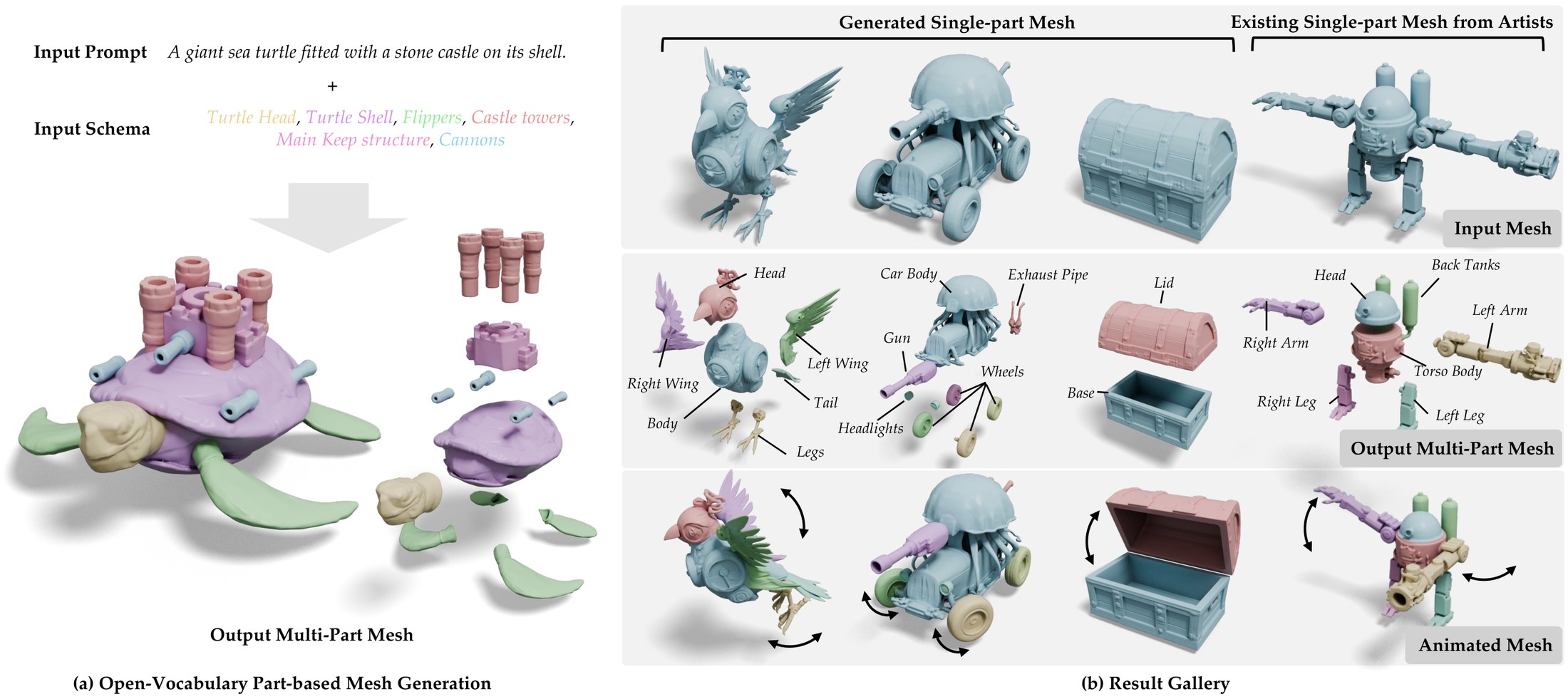
CubePart is the first generative framework for open-vocabulary, part-controllable 3D mesh generation. Unlike traditional AI 3D models that produce monolithic meshes, CubePart generates a set of individually named, structurally complete meshes that assemble into a coherent object.
Given a text prompt (e.g. "a dwarven steam-powered drilling machine") and a parts schema (e.g. [hull, drill, tracks, smokestack, cockpit]), CubePart generates one mesh per schema element. Each mesh is a distinct, functional, accurately-labeled component that can be directly integrated into game engines and driven by animation, physics, and gameplay scripts.
The parts schema acts as an API contract between the generated asset and gameplay code. This eliminates the manual post-processing typically required to cut, label, and rig AI-generated 3D models.

CubePart Key Capabilities
Official CubePart Sources
Access the paper, code, demo, and official project page.
How CubePart Works
CubePart uses a two-stage generative architecture that separates global shape synthesis from part-level decoding, powered by a scalable data pipeline that constructs the largest open-vocabulary part-labeled 3D dataset.

Schema-Aware Single-Mesh Generation (Stage 1)
VecSet-Based Diffusion
Stage 1 adapts a vecset-based diffusion transformer for text-to-3D generation. The pretrained model is fine-tuned on schema-augmented prompts of the form:
Qwen-VL Encoding
The text prompt and schema are encoded using Qwen-VL, a vision-language model that provides rich semantic understanding of the desired object and its component parts.
Multi-Part Decoding with Cross-Part Attention (Stage 2)

Weight Inheritance
Stage 2 initializes with the MM-DiT weights from Stage 1, preserving the strong single-mesh prior while extending it for multi-part generation.
Cross-Part Attention Residual Blocks
Zero-initialized transformer blocks are injected at four layers. Each block performs cross-part global attention across all part latents and the full shape latent, enabling efficient inter-part structural communication.
Part-Aware Conditioning
Each part receives a part-aware prompt indicating both the target part name and the full schema, ensuring that each generated mesh corresponds to the correct semantic component.
Dataset & Data Engine
Training open-vocabulary part-controllable 3D generators requires datasets that are both large and richly part-labeled. CubePart introduces a scalable data engine combining artist-provided segmentations with VLM-based 3D-aware Set-of-Mark prompting.

Vision-Language Model Labeling
The data engine combines artist-provided segmentations with VLMs and 3D-aware Set-of-Mark prompting to produce concise, semantically meaningful part names at scale. This produces concise names (e.g. hull, tracks) rather than the verbose VLM captions found in prior work.
Scale Advantage
With 462K assets and 2.02M parts, the CubePart dataset has more than 11× the assets (462K vs 40K) and 6.3× the parts (2.02M vs 320K) of PartVerse-XL, while using concise, schema-friendly part names rather than long descriptive captions.
Dataset Comparison
| Dataset | Assets | Parts | Open-Vocabulary | Part Text Type |
|---|---|---|---|---|
| ShapeNetPart | 16K | 93K | ✗ | Taxonomy |
| PartNet | 26K | 573K | ✗ | Taxonomy |
| PartVerse | 12K | 91K | ✓ | Captions |
| PartVerse-XL | 40K | 320K | ✓ | Captions |
| CubePart (Ours) | 462K | 2.02M | ✓ | Names |
CubePart Generation Gallery
Conditioned on a text prompt and a parts schema, CubePart synthesizes detailed global shapes and decomposes them into independent, structurally complete part meshes that adhere to the defined schema.


Browse the full interactive gallery (20+ 3D examples) on the official CubePart project page.
CubePart Summary Video
A comprehensive overview of CubePart's architecture, capabilities, and results presented at SIGGRAPH 2026.
Source: cubepart.github.io
20 Additional CubePart Assets
An extended set of multi-part 3D assets generated by CubePart from text prompts and open-vocabulary part schemas. Each asset can be explored in an interactive 3D viewer on the official browse page.
"A sleek, single-seat anti-gravity racing speeder with glowing engine nacelles."
View 3D Model ↗"A bipedal industrial utility mech designed for lifting heavy cargo containers."
View 3D Model ↗"A fantasy house grown inside a giant red mushroom with white spots."
View 3D Model ↗"A mystical golem creature assembled from floating rocks and glowing crystals."
View 3D Model ↗"A high-speed futuristic train engine retrofitted with massive rocket boosters."
View 3D Model ↗"An autonomous surveillance drone powered by large, gossamer solar sails."
View 3D Model ↗"A futuristic samurai helmet fusing feudal aesthetics with cyberpunk tech."
View 3D Model ↗All assets generated by CubePart. Visit cubepart.github.io/browse.html for interactive 3D viewers with drag-to-rotate and explode controls.
Varying the Part Schema Granularity
The same object can be decomposed at different granularities just by changing the schema — from 2 parts up to 8 parts. CubePart resolves ambiguous boundaries by introducing relevant part names.

CubePart vs Prior Methods
Unlike prior methods that either fix the part vocabulary or infer parts implicitly from 2D segmentation, CubePart guarantees alignment between generated meshes and a user-defined open-vocabulary schema.

| Method | Part Controllable? | Part-Vocabulary | Schema Adherence | Boundary Quality |
|---|---|---|---|---|
| PartCrafter | No | Implicit | ✗ Low | Noisy |
| PartPacker | No | Implicit | ✗ Low | Moderate |
| HoloPart | Yes | Fixed | ▲ Medium | Good |
| OmniPart | No | Implicit | ✗ Low | Moderate |
| CubePart | Yes | Open-Vocabulary | ✓ High | Best |
Quantitative Evaluation on PartObjaverse-Tiny
| Method | Part CD ↓ | Part F-score ↑ | Holistic CD ↓ | Holistic F-score ↑ |
|---|---|---|---|---|
| PartCrafter | 0.493 | 0.290 | 0.272 | 0.552 |
| PartPacker | 0.374 | 0.475 | 0.164 | 0.792 |
| PatchAlign3D + HoloPart | 0.309 | 0.549 | 0.050 | 0.970 |
| SAM3 + OmniPart | 0.309 | 0.630 | 0.053 | 0.970 |
| CubePart (Ours) | 0.251 | 0.743 | 0.048 | 0.974 |
CD = Chamfer Distance (lower is better) · F-score (higher is better). CubePart demonstrates consistent improvements in structural completeness and part-level accuracy.
GLB Part Manifest Builder
Build a structured manifest for your multi-part GLB files, compatible with CubePart's part schema format. Define part names, types, and properties ready for game engine import.
CubePart Prompt Templates
Ready-to-use prompt templates covering characters, vehicles, weapons, environments, and mechanical constructs. Each includes a suggested part schema.
"A humanoid robot with a sleek metallic finish"
"A steampunk airship with brass propellers"
"An enchanted crystal sword with a golden hilt"
"A clockwork dragon with brass scales and ruby eyes"
"A pirate treasure chest with brass fittings"
"A fantasy wizard tower with a crystal dome"
CubePart + Roblox Studio: Script-Ready Naming Guide
How to name your parts so they match Roblox scripting conventions and are immediately usable with Lua scripts, animation controllers, and physics constraints.
LeftArm,RightArmEngineBlock,TurretBaseFrontWheel_L,FrontWheel_RDoor_Front,Door_RearCockpitGlass,HullArmor
part_1,mesh_003a large metallic componentunnamed_geometrymerged_body_and_wheels
Game Engine Integration Workflow
How CubePart-generated multi-part meshes flow into game engines without manual post-processing.
require, WaitForChild, and physics joints.CubePart vs Other AI 3D Tools
How CubePart compares to popular AI 3D generation tools in terms of part control, game engine readiness, and schema support.
| Tool | Multi-Part Output | Named Parts | Schema Control | Game Engine Ready | Open Source |
|---|---|---|---|---|---|
| CubePart | Yes | Yes | Open-vocabulary | Yes | Yes |
| Meshy | No | No | No | Manual | No |
| Tripo | No | No | No | Manual | No |
| Rodin | No | No | No | Manual | No |
| Spline | No | No | No | Manual | No |
| HoloPart | Yes | Fixed | Fixed taxonomy | Partial | Yes |
| OmniPart | Yes | No | No | No | Yes |
CubePart is the only tool that combines open-vocabulary schema control with game-ready multi-part mesh output.
Use Cases for CubePart-Powered Assets
Frequently Asked Questions About CubePart
[body, wheels, doors, engine, headlights]. You can use our free Schema Generator to create schemas instantly, or manually define them as comma-separated lists of part names.
Jump to:
Cite CubePart in Your Research
If you use CubePart in your academic work, please cite the SIGGRAPH 2026 paper.
CubePar Keyword Map
Core, long-tail, and technical keywords for CubePart and part-controllable 3D generation.
CubePart Community & Resources
How to Get Started with CubePart
Roblox/cube from GitHub. Follow the setup instructions in
cubepart/README.md to run generation locally with your own prompts and schemas.
Questions About CubePart?
cubepar.org is an independent resource and does not publish a contact address. For questions about CubePart itself, use the official links below.
Disclaimer: cubepar.org is an independent, unofficial resource. We are not affiliated with, endorsed by, or sponsored by Roblox Corporation, Carnegie Mellon University, Stanford University, Hugging Face, or any of the CubePart paper authors. The CubePart name and technology are property of their respective owners. This site provides free educational tools and references about CubePart, an open-source research project. Official CubePart project: cubepart.github.io. Paper images used under CC BY 4.0.